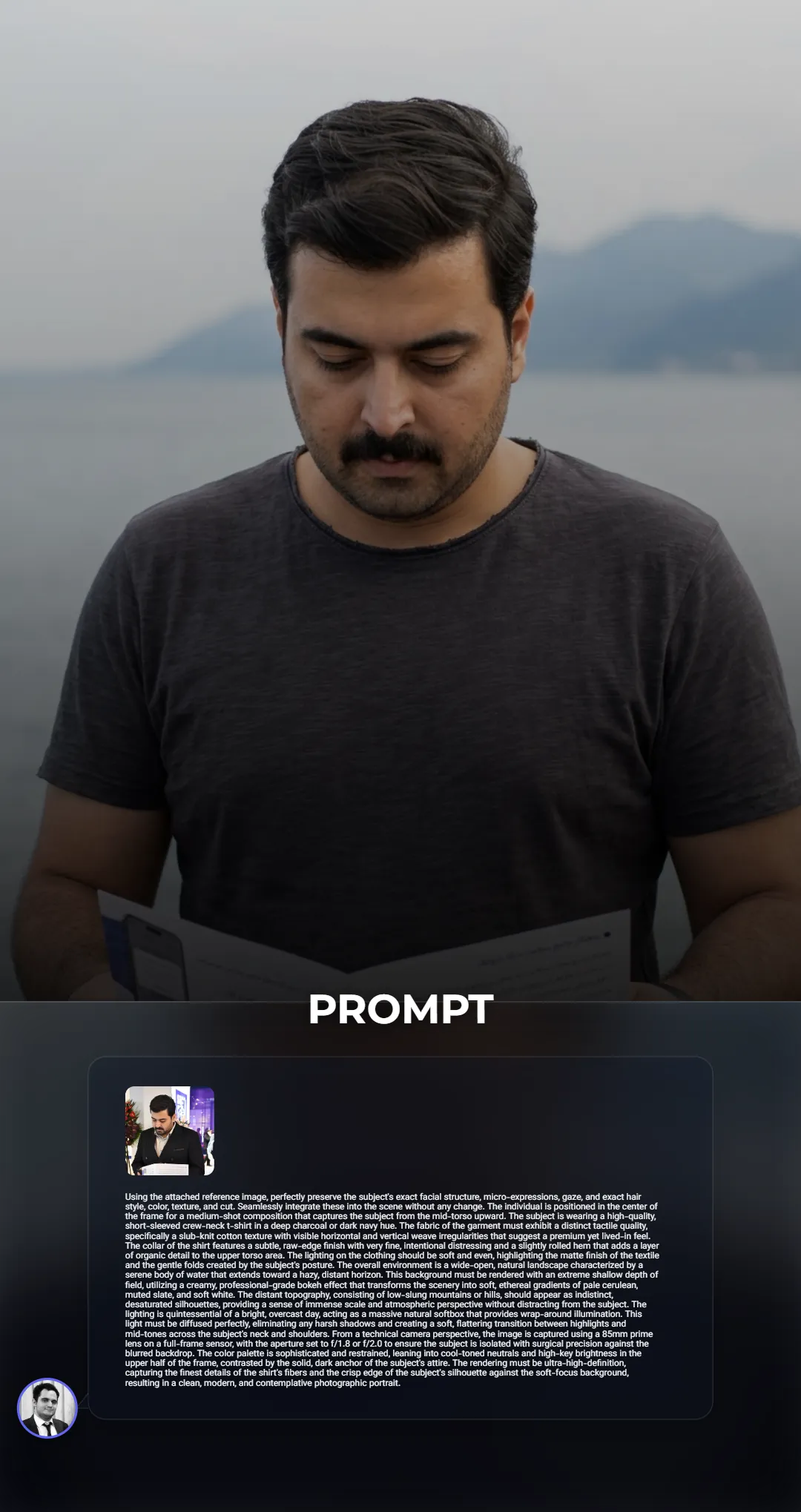
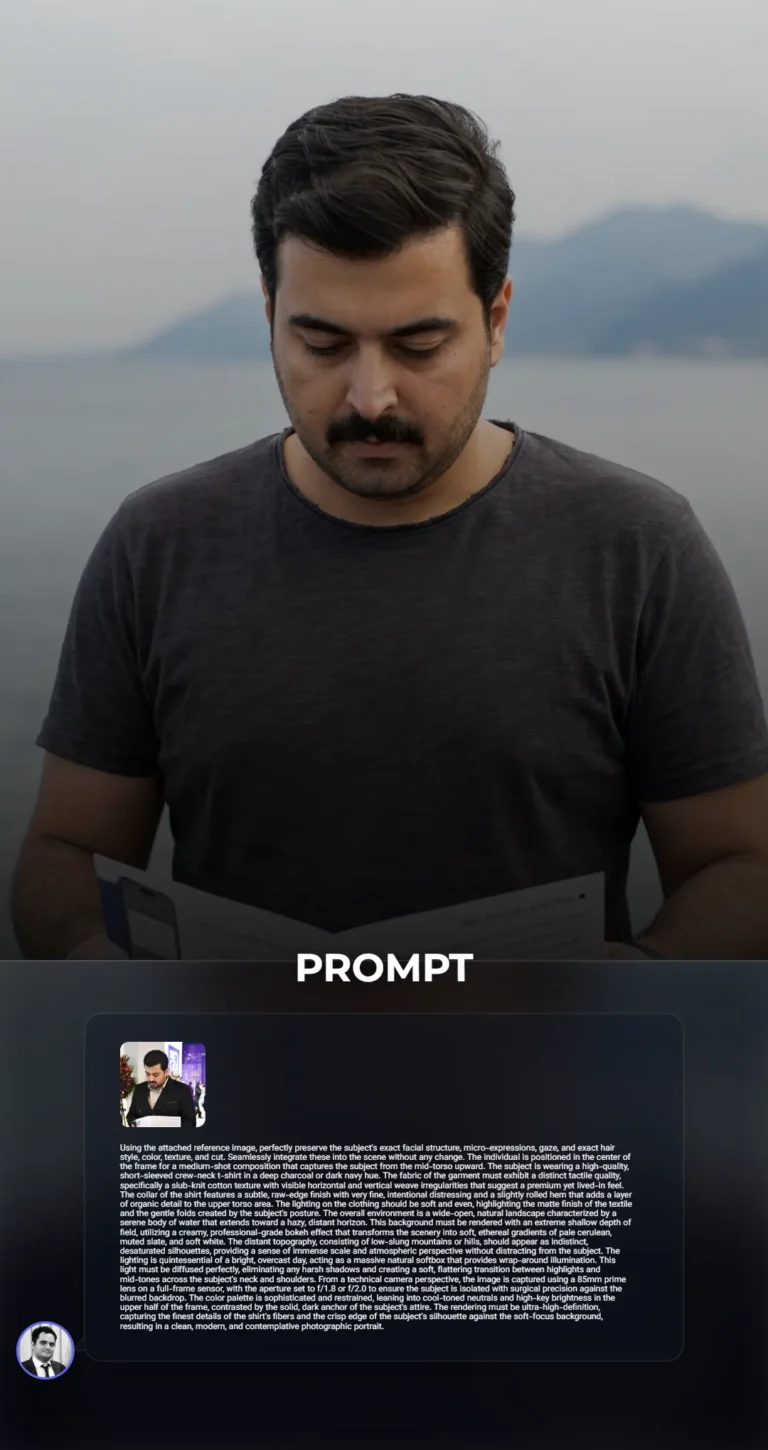
Professional High-Fidelity Portrait with Creamy Bokeh Landscape and Slub-Knit TextureUsing the attached reference image, perfectly preserve the subject's exact facial structure, micro-expressions, gaze, and exact hair style, color, texture, and cut. Seamlessly integrate these into the scene without any change. The individual is positioned in the center of the frame for a medium-shot composition that captures the subject from the mid-torso upward. The subject is wearing a high-quality, short-sleeved crew-neck t-shirt in a deep charcoal or dark navy hue. The fabric of the garment must exhibit a distinct tactile quality, specifically a slub-knit cotton texture with visible horizontal and vertical weave irregularities that suggest a premium yet lived-in feel. The collar of the shirt features a subtle, raw-edge finish with very fine, intentional distressing and a slightly rolled hem that adds a layer of organic detail to the upper torso area. The lighting on the clothing should be soft and even, highlighting the matte finish of the textile and the gentle folds created by the subject's posture. The overall environment is a wide-open, natural landscape characterized by a serene body of water that extends toward a hazy, distant horizon. This background must be rendered with an extreme shallow depth of field, utilizing a creamy, professional-grade bokeh effect that transforms the scenery into soft, ethereal gradients of pale cerulean, muted slate, and soft white. The distant topography, consisting of low-slung mountains or hills, should appear as indistinct, desaturated silhouettes, providing a sense of immense scale and atmospheric perspective without distracting from the subject. The lighting is quintessential of a bright, overcast day, acting as a massive natural softbox that provides wrap-around illumination. This light must be diffused perfectly, eliminating any harsh shadows and creating a soft, flattering transition between highlights and mid-tones across the subject's neck and shoulders. From a technical camera perspective, the image is captured using a 85mm prime lens on a full-frame sensor, with the aperture set to f/1.8 or f/2.0 to ensure the subject is isolated with surgical precision against the blurred backdrop. The color palette is sophisticated and restrained, leaning into cool-toned neutrals and high-key brightness in the upper half of the frame, contrasted by the solid, dark anchor of the subject's attire. The rendering must be ultra-high-definition, capturing the finest details of the shirt's fibers and the crisp edge of the subject's silhouette against the soft-focus background, resulting in a clean, modern, and contemplative photographic portrait.
Professional High-Fidelity Portrait with Creamy Bokeh Landscape and Slub-Knit TextureUsing the attached reference image, perfectly preserve the subject's exact facial structure, micro-expressions, gaze, and exact hair style, color, texture, and cut. Seamlessly integrate these into the scene without any change. The individual is positioned in the center of the frame for a medium-shot composition that captures the subject from the mid-torso upward. The subject is wearing a high-quality, short-sleeved crew-neck t-shirt in a deep charcoal or dark navy hue. The fabric of the garment must exhibit a distinct tactile quality, specifically a slub-knit cotton texture with visible horizontal and vertical weave irregularities that suggest a premium yet lived-in feel. The collar of the shirt features a subtle, raw-edge finish with very fine, intentional distressing and a slightly rolled hem that adds a layer of organic detail to the upper torso area. The lighting on the clothing should be soft and even, highlighting the matte finish of the textile and the gentle folds created by the subject's posture. The overall environment is a wide-open, natural landscape characterized by a serene body of water that extends toward a hazy, distant horizon. This background must be rendered with an extreme shallow depth of field, utilizing a creamy, professional-grade bokeh effect that transforms the scenery into soft, ethereal gradients of pale cerulean, muted slate, and soft white. The distant topography, consisting of low-slung mountains or hills, should appear as indistinct, desaturated silhouettes, providing a sense of immense scale and atmospheric perspective without distracting from the subject. The lighting is quintessential of a bright, overcast day, acting as a massive natural softbox that provides wrap-around illumination. This light must be diffused perfectly, eliminating any harsh shadows and creating a soft, flattering transition between highlights and mid-tones across the subject's neck and shoulders. From a technical camera perspective, the image is captured using a 85mm prime lens on a full-frame sensor, with the aperture set to f/1.8 or f/2.0 to ensure the subject is isolated with surgical precision against the blurred backdrop. The color palette is sophisticated and restrained, leaning into cool-toned neutrals and high-key brightness in the upper half of the frame, contrasted by the solid, dark anchor of the subject's attire. The rendering must be ultra-high-definition, capturing the finest details of the shirt's fibers and the crisp edge of the subject's silhouette against the soft-focus background, resulting in a clean, modern, and contemplative photographic portrait.
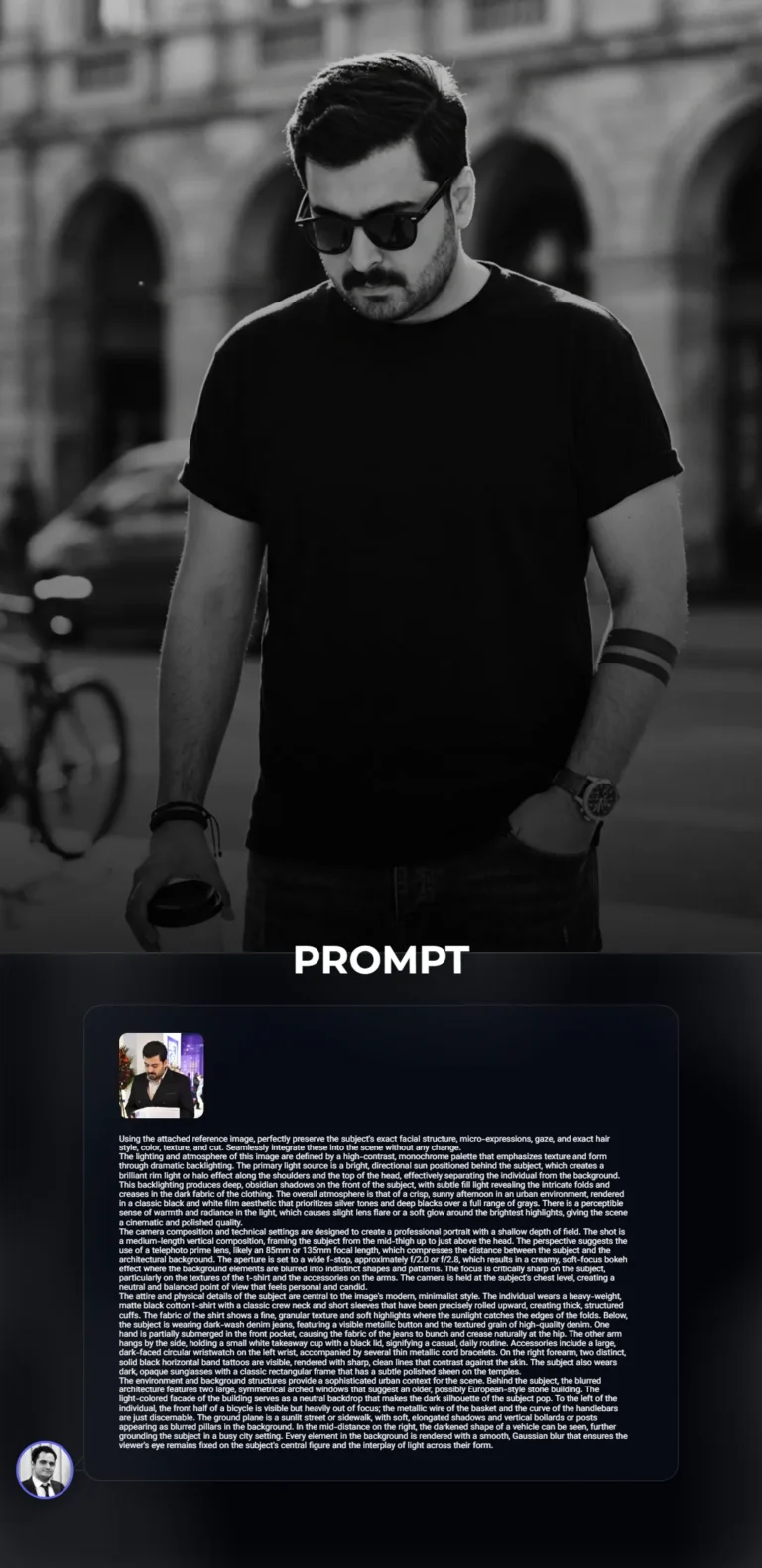
Cinematic B&W Urban Portrait - Backlit Minimalist Street StyleUsing the attached reference image, perfectly preserve the subject's exact facial structure, micro-expressions, gaze, and exact hair style, color, texture, and cut. Seamlessly integrate these into the scene without any change.
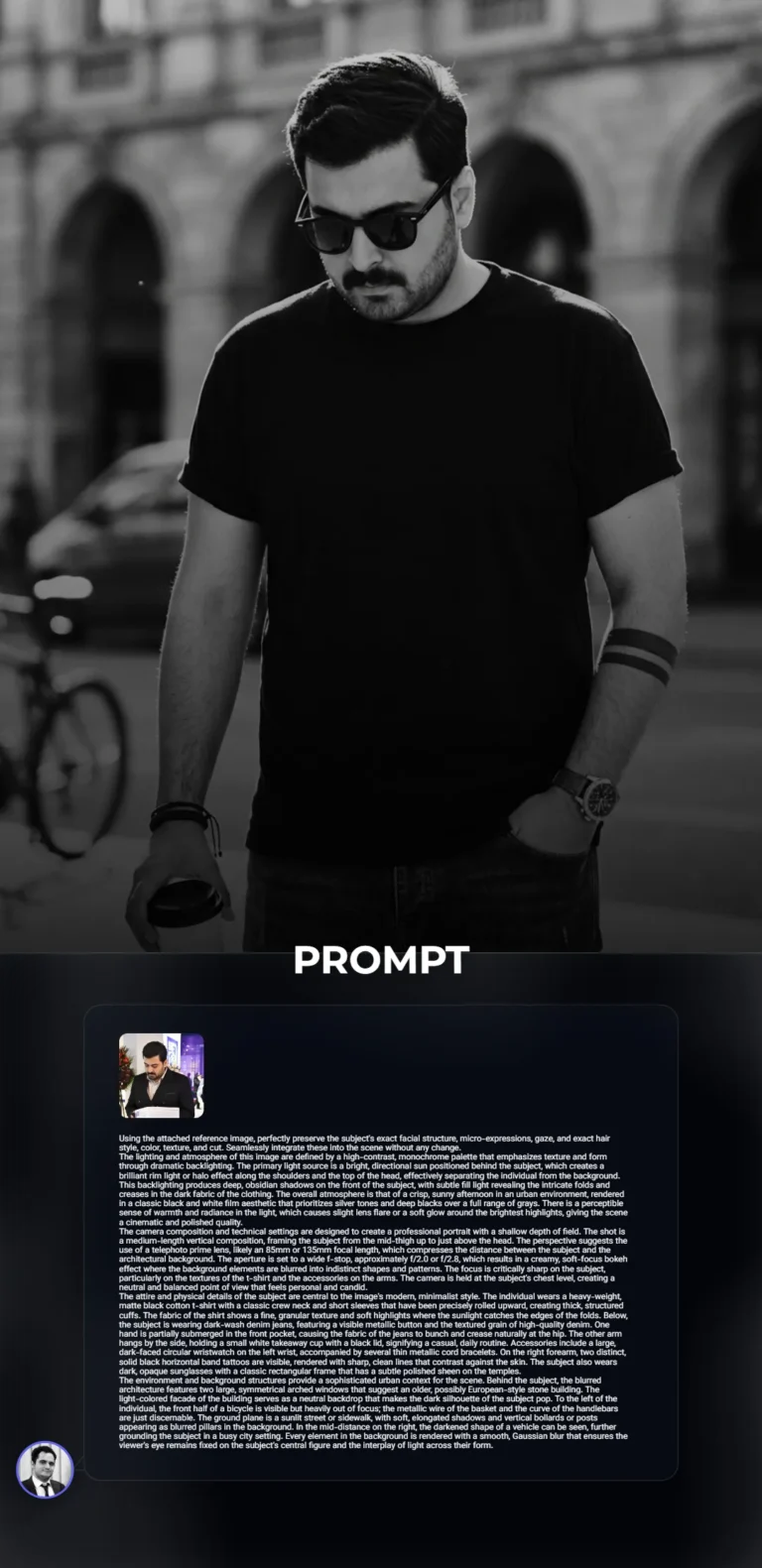
The lighting and atmosphere of this image are defined by a high-contrast, monochrome palette that emphasizes texture and form through dramatic backlighting. The primary light source is a bright, directional sun positioned behind the subject, which creates a brilliant rim light or halo effect along the shoulders and the top of the head, effectively separating the individual from the background. This backlighting produces deep, obsidian shadows on the front of the subject, with subtle fill light revealing the intricate folds and creases in the dark fabric of the clothing. The overall atmosphere is that of a crisp, sunny afternoon in an urban environment, rendered in a classic black and white film aesthetic that prioritizes silver tones and deep blacks over a full range of grays. There is a perceptible sense of warmth and radiance in the light, which causes slight lens flare or a soft glow around the brightest highlights, giving the scene a cinematic and polished quality.
The camera composition and technical settings are designed to create a professional portrait with a shallow depth of field. The shot is a medium-length vertical composition, framing the subject from the mid-thigh up to just above the head. The perspective suggests the use of a telephoto prime lens, likely an 85mm or 135mm focal length, which compresses the distance between the subject and the architectural background. The aperture is set to a wide f-stop, approximately f/2.0 or f/2.8, which results in a creamy, soft-focus bokeh effect where the background elements are blurred into indistinct shapes and patterns. The focus is critically sharp on the subject, particularly on the textures of the t-shirt and the accessories on the arms. The camera is held at the subject's chest level, creating a neutral and balanced point of view that feels personal and candid.
The attire and physical details of the subject are central to the image's modern, minimalist style. The individual wears a heavy-weight, matte black cotton t-shirt with a classic crew neck and short sleeves that have been precisely rolled upward, creating thick, structured cuffs. The fabric of the shirt shows a fine, granular texture and soft highlights where the sunlight catches the edges of the folds. Below, the subject is wearing dark-wash denim jeans, featuring a visible metallic button and the textured grain of high-quality denim. One hand is partially submerged in the front pocket, causing the fabric of the jeans to bunch and crease naturally at the hip. The other arm hangs by the side, holding a small white takeaway cup with a black lid, signifying a casual, daily routine. Accessories include a large, dark-faced circular wristwatch on the left wrist, accompanied by several thin metallic cord bracelets. On the right forearm, two distinct, solid black horizontal band tattoos are visible, rendered with sharp, clean lines that contrast against the skin. The subject also wears dark, opaque sunglasses with a classic rectangular frame that has a subtle polished sheen on the temples.
The environment and background structures provide a sophisticated urban context for the scene. Behind the subject, the blurred architecture features two large, symmetrical arched windows that suggest an older, possibly European-style stone building. The light-colored facade of the building serves as a neutral backdrop that makes the dark silhouette of the subject pop. To the left of the individual, the front half of a bicycle is visible but heavily out of focus; the metallic wire of the basket and the curve of the handlebars are just discernable. The ground plane is a sunlit street or sidewalk, with soft, elongated shadows and vertical bollards or posts appearing as blurred pillars in the background. In the mid-distance on the right, the darkened shape of a vehicle can be seen, further grounding the subject in a busy city setting. Every element in the background is rendered with a smooth, Gaussian blur that ensures the viewer's eye remains fixed on the subject's central figure and the interplay of light across their form.

Cinematic Golden Hour Portrait at Rustic Urban CafeUsing the attached reference image, perfectly preserve the subject's exact facial structure, micro-expressions, gaze, and exact hair style, color, texture, and cut. Seamlessly integrate these into the scene without any change. The camera is positioned at a low-angle perspective, looking slightly upward at the subject to create a sense of presence and stature. This vertical composition utilizes a professional full-frame camera equipped with an 85mm prime lens to achieve a tight, intimate framing that compresses the background while keeping the subject in razor-sharp focus. The aperture is set to a wide f/1.8 or f/2.8, resulting in a shallow depth of field that renders the background into a creamy, soft-focus bokeh, effectively isolating the individual from the architectural elements of the cafe. The framing captures the subject from the top of the head down to the feet, emphasizing a relaxed, cross-legged seated posture. Every detail is rendered with high-resolution clarity, capturing the minute nuances of the surrounding environment while maintaining a cinematic and polished aesthetic.
The lighting is dominated by intense, directional natural sunlight coming from an upper-side angle, characteristic of the golden hour or a bright late afternoon. This light creates a high-contrast chiaroscuro effect, with brilliant highlights tracing the contours of the subject and deep, well-defined shadows falling across the clothing and the floor. The sunlight catches the edges of the linen fabric, revealing its intricate weave, while the shadows under the table and behind the subject provide a sense of three-dimensional depth. There is a warm, amber-toned glow permeating the scene, reflecting off the wooden surfaces and casting a soft, golden radiance throughout the frame. The highlights are bright but retain detail, while the shadows are rich and saturated, contributing to a vibrant and dynamic visual atmosphere that feels both warm and inviting.
The subject is dressed in a sophisticated ensemble of layered neutral tones and high-quality textures. The outermost layer is an oversized, long-sleeved button-down shirt made of a heavy-weight, textured linen in a muted taupe or light beige hue. The fabric exhibits characteristic linen slubs and wrinkles, particularly around the elbows and chest, with the sleeves loosely rolled up to the mid-forearm. Underneath, a crisp, matte white cotton t-shirt provides a clean contrast, featuring a simple crew neck. The trousers are a pair of well-fitted, light cream or off-white chinos or linen-blend pants, showing prominent creases and folds where the legs are crossed. The footwear consists of clean, white low-top sneakers with subtle tan or light brown suede accents on the heel and tongue, featuring thick, off-white rubber soles. Accessories include a thin silver chain with a small circular pendant, a dark-beaded bracelet on the right wrist, and a sophisticated watch with a large black face and a dark metallic link strap on the left wrist.
The setting is a rustic yet modern outdoor cafe or bistro. The subject is seated on a dark, curved wooden chair with a visible grain and a polished finish. In front of the individual is a round, heavy wooden pedestal table with a rich, warm mahogany or walnut stain. On the table, a clear plastic cup filled with an iced latte or coffee drink sits prominently, showing visible ice cubes, a gradient of milk and coffee, a black straw, and a white label with the text ST. ALi COFFEE ROASTERS in bold, black sans-serif typography. Next to the coffee, a pair of classic dark-tinted sunglasses with gold-rimmed frames rests folded on the wooden surface. The background consists of a blurred cafe interior featuring dark wood paneling, shelving with metallic coffee-making equipment, and a chalkboard menu, all bathed in the same warm, diffused light. The floor is composed of dark, weathered stone tiles or pavers, catching the dappled light and shadows from the overhead structures or nearby trees, completing the urban, sun-drenched atmosphere.

Urban Streetwear Cinematic Portrait - Slate Blue Hoodie and White DenimUsing the attached reference image, perfectly preserve the subject's exact facial structure, micro-expressions, gaze, and exact hair style, color, texture, and cut. Seamlessly integrate these into the scene without any change. The subject is positioned in a seated, relaxed posture on a set of weathered outdoor wooden stairs, angled slightly away from the camera while looking toward the right of the frame. The subject is wearing an oversized, heavyweight hoodie in a deep slate-blue or muted indigo hue. The fabric of the hoodie is a thick, high-quality cotton fleece, characterized by a soft matte finish that catches the light in a subtle, diffused manner, showing heavy folds and deep sculptural creases around the elbows and torso. The cuffs of the hoodie are ribbed and slightly pushed up the forearms. On the subject's left wrist is a prominent, high-end stainless steel watch with a brushed metallic finish and a large, circular black dial featuring silver indices and a clear sapphire crystal that reflects the surrounding ambient light. The subject's hands are brought together in front of the midsection, with the right hand delicately adjusting the watch or the sleeve. The lower half of the attire consists of light-wash, almost white, straight-leg denim trousers. The denim has a visible diagonal twill weave and is finished with a distinct, raw, and frayed hem at the bottom, where individual white threads are exposed. The subject is seated on dark-stained wooden steps that show signs of natural wear, with visible wood grain, minor scuffs, and a rich, earthy texture.
The scene is captured with a professional-grade full-frame camera and a prime lens, likely an 85mm or 105mm focal length, to create a compressed perspective and a shallow depth of field. The aperture is set wide, around f/2.0 or f/2.8, which creates a soft, creamy bokeh in the background. The background elements, including a series of vertical and horizontal metal railing bars and a dark, shadowed architectural area, are rendered in a soft blur, ensuring the viewer's focus remains entirely on the subject. To the right of the subject, a black skateboard is leaned vertically against the stairs, showing a detailed honeycomb or perforated grip tape texture on its deck. The composition uses a medium-close shot, framing the subject from the mid-thigh up to the top of the head, with the camera positioned at a slightly low angle to give the subject a sense of presence and stature. The framing is tight, focusing on the interplay of the textures between the fabric, the metal of the watch, and the organic surface of the wood.
The lighting is natural, bright, and directional, suggesting an outdoor setting during the late afternoon when the sun is lower in the sky. This produces a soft but clear highlight along the subject's profile and the edges of the clothing, while the shadows remain open and full of detail rather than being crushed into pure black. There is a warm, golden-hour quality to the light that enhances the skin tones and adds a slight glow to the highlights of the hoodie. The color palette is sophisticated and restrained, dominated by the cool tones of the slate-blue hoodie and the stark white of the trousers, which are balanced by the warm browns of the wooden steps and the neutral blacks of the sunglasses and skateboard. The overall atmosphere is one of casual urban elegance, combining streetwear aesthetics with high-quality photography. Every detail, from the micro-textures of the frayed denim to the subtle reflections on the watch face, must be rendered with hyper-realistic precision to match the clarity and depth of the original image. The final render should have a filmic quality, with a subtle grain and a high dynamic range that preserves detail in both the bright white pants and the deep folds of the dark hoodie.
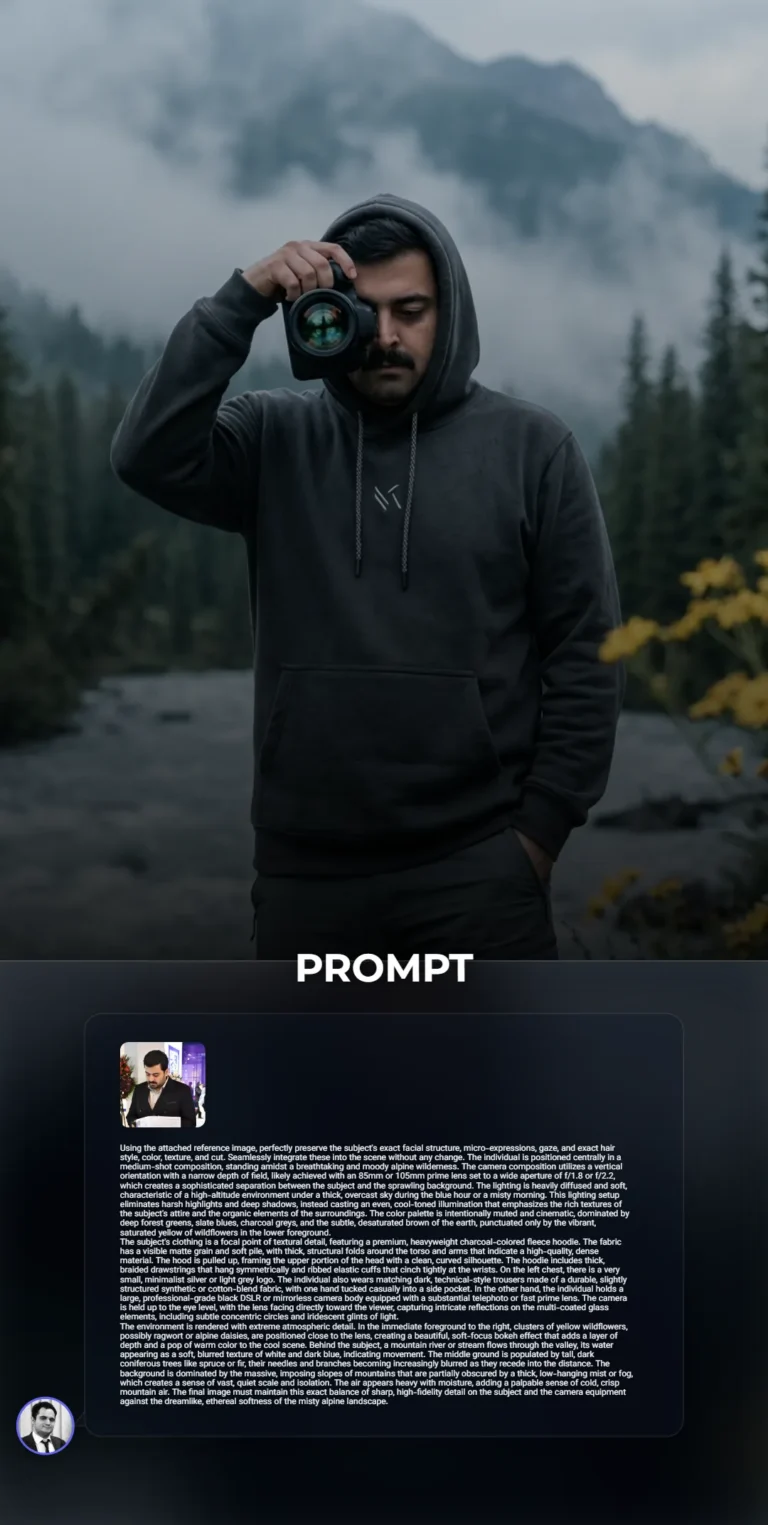
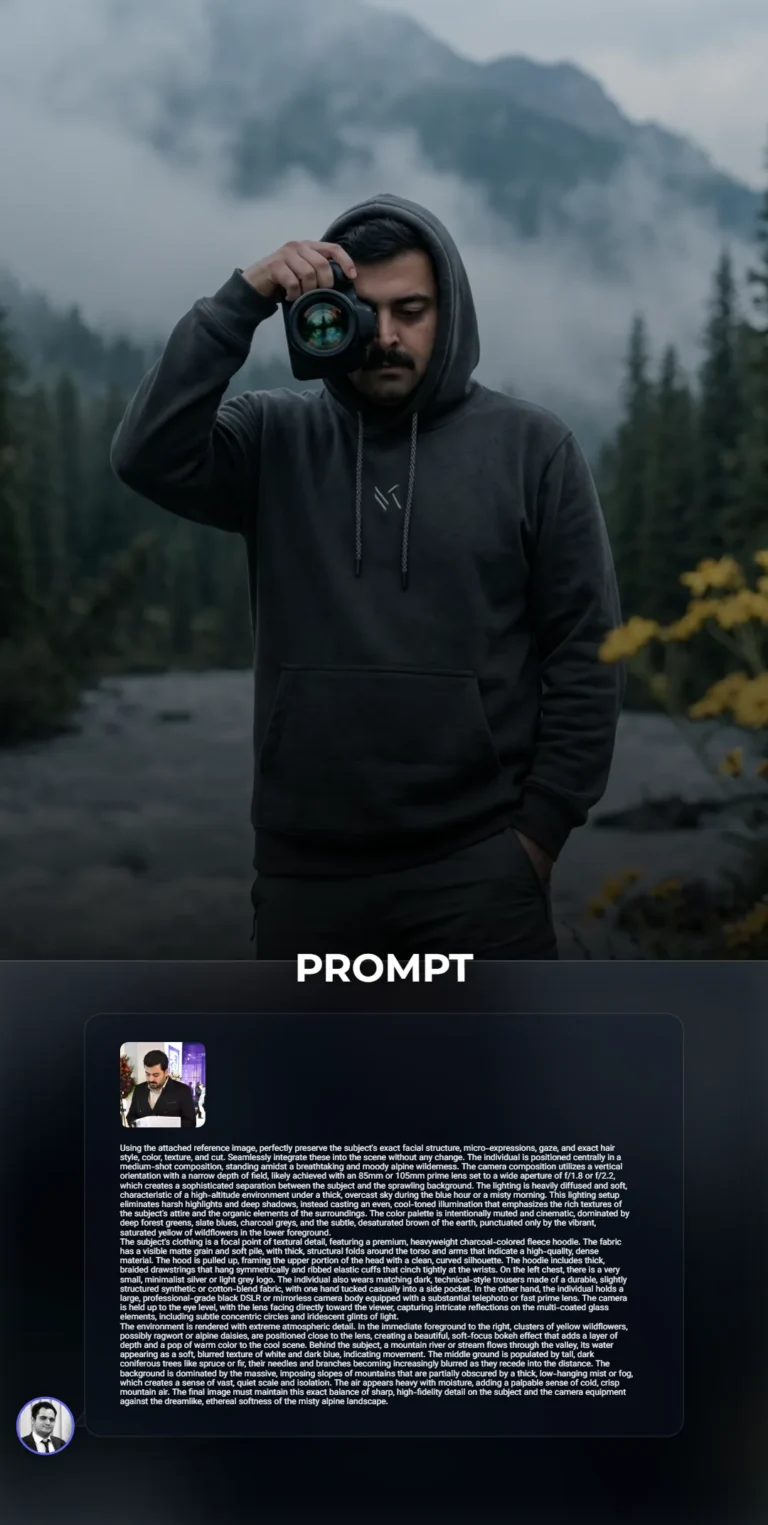
Professional Photographer in Moody Alpine Wilderness Fleece Hoodie PortraitUsing the attached reference image, perfectly preserve the subject's exact facial structure, micro-expressions, gaze, and exact hair style, color, texture, and cut. Seamlessly integrate these into the scene without any change. The individual is positioned centrally in a medium-shot composition, standing amidst a breathtaking and moody alpine wilderness. The camera composition utilizes a vertical orientation with a narrow depth of field, likely achieved with an 85mm or 105mm prime lens set to a wide aperture of f/1.8 or f/2.2, which creates a sophisticated separation between the subject and the sprawling background. The lighting is heavily diffused and soft, characteristic of a high-altitude environment under a thick, overcast sky during the blue hour or a misty morning. This lighting setup eliminates harsh highlights and deep shadows, instead casting an even, cool-toned illumination that emphasizes the rich textures of the subject's attire and the organic elements of the surroundings. The color palette is intentionally muted and cinematic, dominated by deep forest greens, slate blues, charcoal greys, and the subtle, desaturated brown of the earth, punctuated only by the vibrant, saturated yellow of wildflowers in the lower foreground.
The subject's clothing is a focal point of textural detail, featuring a premium, heavyweight charcoal-colored fleece hoodie. The fabric has a visible matte grain and soft pile, with thick, structural folds around the torso and arms that indicate a high-quality, dense material. The hood is pulled up, framing the upper portion of the head with a clean, curved silhouette. The hoodie includes thick, braided drawstrings that hang symmetrically and ribbed elastic cuffs that cinch tightly at the wrists. On the left chest, there is a very small, minimalist silver or light grey logo. The individual also wears matching dark, technical-style trousers made of a durable, slightly structured synthetic or cotton-blend fabric, with one hand tucked casually into a side pocket. In the other hand, the individual holds a large, professional-grade black DSLR or mirrorless camera body equipped with a substantial telephoto or fast prime lens. The camera is held up to the eye level, with the lens facing directly toward the viewer, capturing intricate reflections on the multi-coated glass elements, including subtle concentric circles and iridescent glints of light.
The environment is rendered with extreme atmospheric detail. In the immediate foreground to the right, clusters of yellow wildflowers, possibly ragwort or alpine daisies, are positioned close to the lens, creating a beautiful, soft-focus bokeh effect that adds a layer of depth and a pop of warm color to the cool scene. Behind the subject, a mountain river or stream flows through the valley, its water appearing as a soft, blurred texture of white and dark blue, indicating movement. The middle ground is populated by tall, dark coniferous trees like spruce or fir, their needles and branches becoming increasingly blurred as they recede into the distance. The background is dominated by the massive, imposing slopes of mountains that are partially obscured by a thick, low-hanging mist or fog, which creates a sense of vast, quiet scale and isolation. The air appears heavy with moisture, adding a palpable sense of cold, crisp mountain air. The final image must maintain this exact balance of sharp, high-fidelity detail on the subject and the camera equipment against the dreamlike, ethereal softness of the misty alpine landscape.
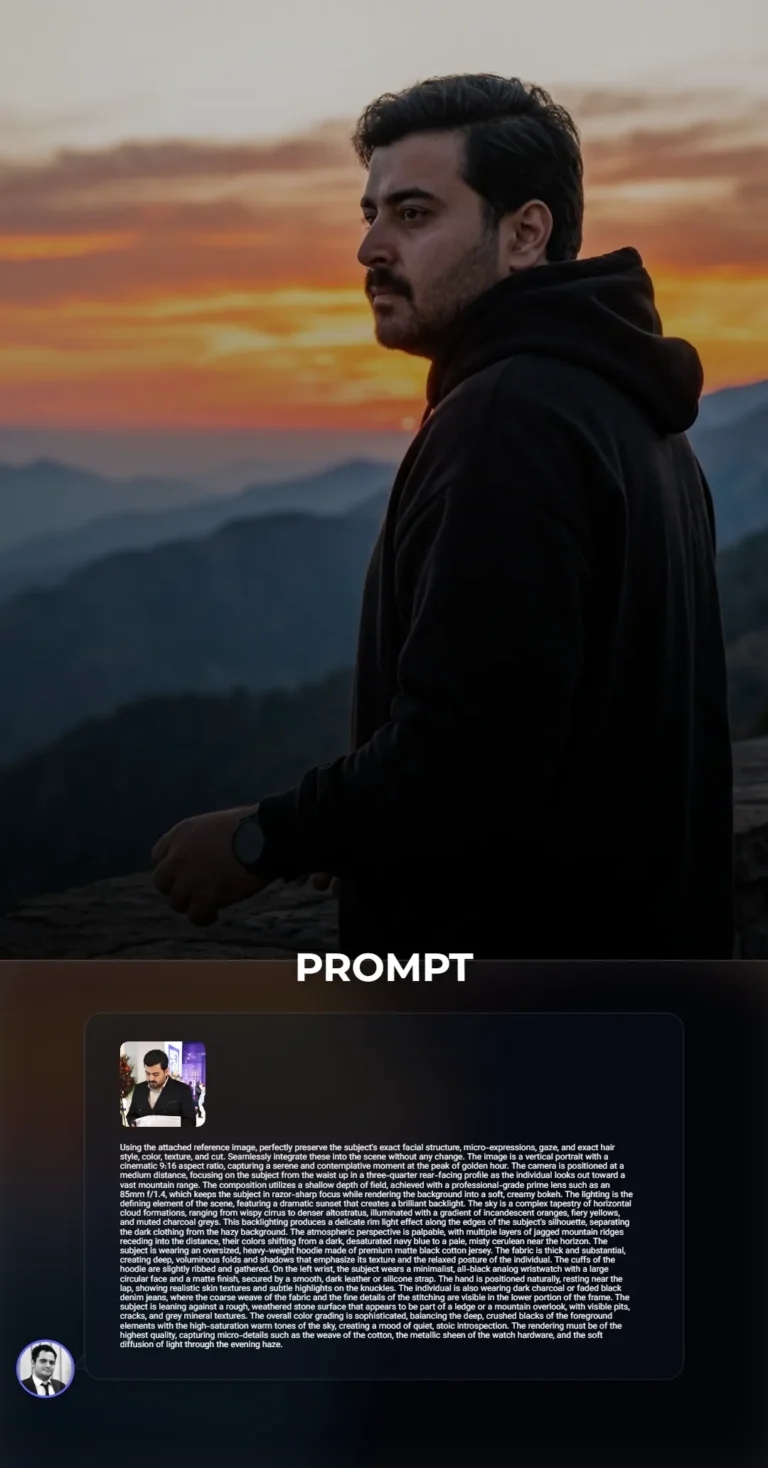
Cinematic Golden Hour Mountain Portrait - Matte Black Hoodie StyleUsing the attached reference image, perfectly preserve the subject's exact facial structure, micro-expressions, gaze, and exact hair style, color, texture, and cut. Seamlessly integrate these into the scene without any change. The image is a vertical portrait with a cinematic 9:16 aspect ratio, capturing a serene and contemplative moment at the peak of golden hour. The camera is positioned at a medium distance, focusing on the subject from the waist up in a three-quarter rear-facing profile as the individual looks out toward a vast mountain range. The composition utilizes a shallow depth of field, achieved with a professional-grade prime lens such as an 85mm f/1.4, which keeps the subject in razor-sharp focus while rendering the background into a soft, creamy bokeh. The lighting is the defining element of the scene, featuring a dramatic sunset that creates a brilliant backlight. The sky is a complex tapestry of horizontal cloud formations, ranging from wispy cirrus to denser altostratus, illuminated with a gradient of incandescent oranges, fiery yellows, and muted charcoal greys. This backlighting produces a delicate rim light effect along the edges of the subject's silhouette, separating the dark clothing from the hazy background. The atmospheric perspective is palpable, with multiple layers of jagged mountain ridges receding into the distance, their colors shifting from a dark, desaturated navy blue to a pale, misty cerulean near the horizon. The subject is wearing an oversized, heavy-weight hoodie made of premium matte black cotton jersey. The fabric is thick and substantial, creating deep, voluminous folds and shadows that emphasize its texture and the relaxed posture of the individual. The cuffs of the hoodie are slightly ribbed and gathered. On the left wrist, the subject wears a minimalist, all-black analog wristwatch with a large circular face and a matte finish, secured by a smooth, dark leather or silicone strap. The hand is positioned naturally, resting near the lap, showing realistic skin textures and subtle highlights on the knuckles. The individual is also wearing dark charcoal or faded black denim jeans, where the coarse weave of the fabric and the fine details of the stitching are visible in the lower portion of the frame. The subject is leaning against a rough, weathered stone surface that appears to be part of a ledge or a mountain overlook, with visible pits, cracks, and grey mineral textures. The overall color grading is sophisticated, balancing the deep, crushed blacks of the foreground elements with the high-saturation warm tones of the sky, creating a mood of quiet, stoic introspection. The rendering must be of the highest quality, capturing micro-details such as the weave of the cotton, the metallic sheen of the watch hardware, and the soft diffusion of light through the evening haze.

Cinematic High-Fashion Portrait of Subject with White Long-Haired CatUsing the attached reference image, perfectly preserve the subject's exact facial structure, micro-expressions, gaze, and exact hair style, color, texture, and cut. Seamlessly integrate these into the scene without any change. The subject is positioned in a central, close-up frame, filling most of the vertical space from the chest upward. The individual is leaning in close to a white long-haired cat, creating an intimate and warm portrait. One hand is raised toward the temple, fingers gently grasping the edge of a black knit beanie, while the other hand cradles the cat’s lower body, with fingers delicately holding one of the cat's front paws to reveal the soft pink paw pads. The cat is positioned in the lower-left foreground, looking directly toward the viewer with large, luminous blue eyes. The composition focuses heavily on the interaction between the individual and the animal, creating an atmosphere of gentle affection and calm.
The scene is illuminated by professional studio lighting that is soft and directional, likely from a large softbox positioned slightly to the camera's left. This creates a gentle gradient across the skin, highlighting the facial contours and forehead while casting soft, cinematic shadows on the opposite side. The lighting is meticulously balanced to prevent harsh highlights, maintaining a smooth, matte quality on the skin and the cat’s fur. Sharp, tiny catchlights are reflected in both the subject's and the cat's eyes, giving them a lifelike, sparkling appearance. The overall atmosphere is quiet, modern, and high-fashion, with a clean and sophisticated tonal range that emphasizes clarity and texture.
The individual wears a black t-shirt made of a high-quality, matte cotton jersey fabric, which shows subtle folds and a fine grain where it meets the neck. A black, ribbed knit beanie sits atop the head, showing a distinct tactile weave and soft woolen fibers with a slight fuzziness to the material. The accessories are captured with high precision: a medium-gauge silver chain necklace hangs around the neck, ending in a polished, teardrop-shaped silver pendant that catches the soft studio light. On the hand holding the cat, there is a large, chunky silver ring with an oxidized, textured finish and a smaller, two-toned ring consisting of a silver band and a thin gold inset. A simple, polished silver hoop earring is visible on the ear, reflecting the surrounding environment.
The cat is a striking white long-hair breed with fur that is exceptionally bright and clean. Individual strands are visible, showing a mix of fine undercoat and longer guard hairs that create a soft, ethereal halo around its body against the dark clothing. The cat’s eyes are a deep, clear cerulean blue with dark pupils. Its nose is a soft, pale pink, matching the color of the articulated paw pads held by the subject. The fur around the cat’s face is dense and plush, transitioning into longer, wispy whiskers that extend outward. The contrast between the brilliant white fur and the subject's dark clothing and beanie is sharp and intentional, drawing the eye to the center of the frame.
The image is captured as if through a high-resolution full-frame camera using a portrait-length lens, such as an 85mm prime, with a wide aperture of approximately f/2.0. This choice of lens creates a shallow depth of field, resulting in a creamy, out-of-focus background while keeping the subject's features and the cat’s face in razor-sharp focus. The camera is positioned at eye level, fostering a direct connection with the viewer. The framing is a tight vertical portrait, cutting off just below the chest and at the top of the beanie, emphasizing the proximity and emotional bond.
The background is a minimalist, dark charcoal grey studio backdrop with a subtle, mottled texture reminiscent of hand-painted canvas or fine concrete. It is significantly darker than the subject, providing a neutral stage that allows the white cat and the skin tones to stand out prominently. The color palette is highly controlled and sophisticated, dominated by monochromatic tones of black, grey, and white, with the only warmth coming from the natural skin tones and the soft pink accents on the cat’s nose and paws. The rendering is crisp and clean, with a slight filmic grain that adds to the professional editorial quality of the photograph.

Urban Studio Portrait with Intense Orange Rim LightingUsing the attached reference image, perfectly preserve the subject's exact facial structure, micro-expressions, gaze, and exact hair style, color, texture, and cut. Seamlessly integrate these into the scene without any change. The scene is set against a monochromatic, high-intensity orange background that possesses a luminous, saturated quality, creating a vibrant and energetic atmosphere. This backdrop is not perfectly flat but features a subtle, soft-box glow emanating from behind the individual, creating a gentle gradient that is slightly brighter in the center and deepens toward the edges of the frame. The lighting is a sophisticated dual-tone studio arrangement, characterized by a dramatic red-orange rim light that sharply defines the silhouette on the right side of the frame, catching the edges of the clothing and the individual's skin with a fiery, saturated glow. A softer, more neutral key light illuminates the subject from the front-left, ensuring that the textures of the garments and the intricacies of the tattoos are clearly visible while maintaining deep, cinematic shadows that provide a three-dimensional depth to the composition.
The subject is wearing an oversized, heavyweight black cotton t-shirt with a thick, ribbed crew-neck collar. The fabric of the shirt has a matte finish that absorbs light, contrasted sharply by a large, centered graphic in a crisp, bone-white hue. This graphic consists of abstract, jagged, flame-like shapes or distorted, organic lettering that reaches upward across the chest. The sleeves are wide and drop-shouldered, ending mid-forearm to reveal a series of detailed tattoos. On the individual's right forearm, there is an intricate, dark ink illustration of a bird or phoenix with spread wings, while the left hand and fingers are adorned with complex, fine-line patterns and shading. A specific piece of script-style calligraphy is visible on the side of the neck, following the natural curve of the anatomy. The individual's hands are positioned in the lower center of the frame, with one hand gently grasping the fingers of the other in a candid, contemplative gesture.
Accessory details are critical for accuracy, including the thin-framed, round-lens spectacles that have a subtle tortoiseshell or metallic brown finish, catching a bright glint of the studio lights on the lenses. The individual wears a thick, polished silver curb-link chain bracelet on the left wrist, and multiple heavy, ornate metallic rings on the fingers, including a dark signet ring on the right hand and a silver-toned band on the left. The camera composition is a waist-up medium shot, utilizing a professional 85mm prime lens to achieve a shallow depth of field. This ensures the mid-plane of the subject is in razor-sharp focus, while the hands in the foreground and the extreme background exhibit a very soft, aesthetic blur. The digital rendering must be of the highest quality, with no visible noise, emphasizing the clean lines, the high-contrast color palette of orange, black, and white, and the tactile textures of the fabric and ink. The overall mood is one of modern, urban intensity, captured with a high-shutter speed to freeze the subtle micro-expression and the stillness of the pose.
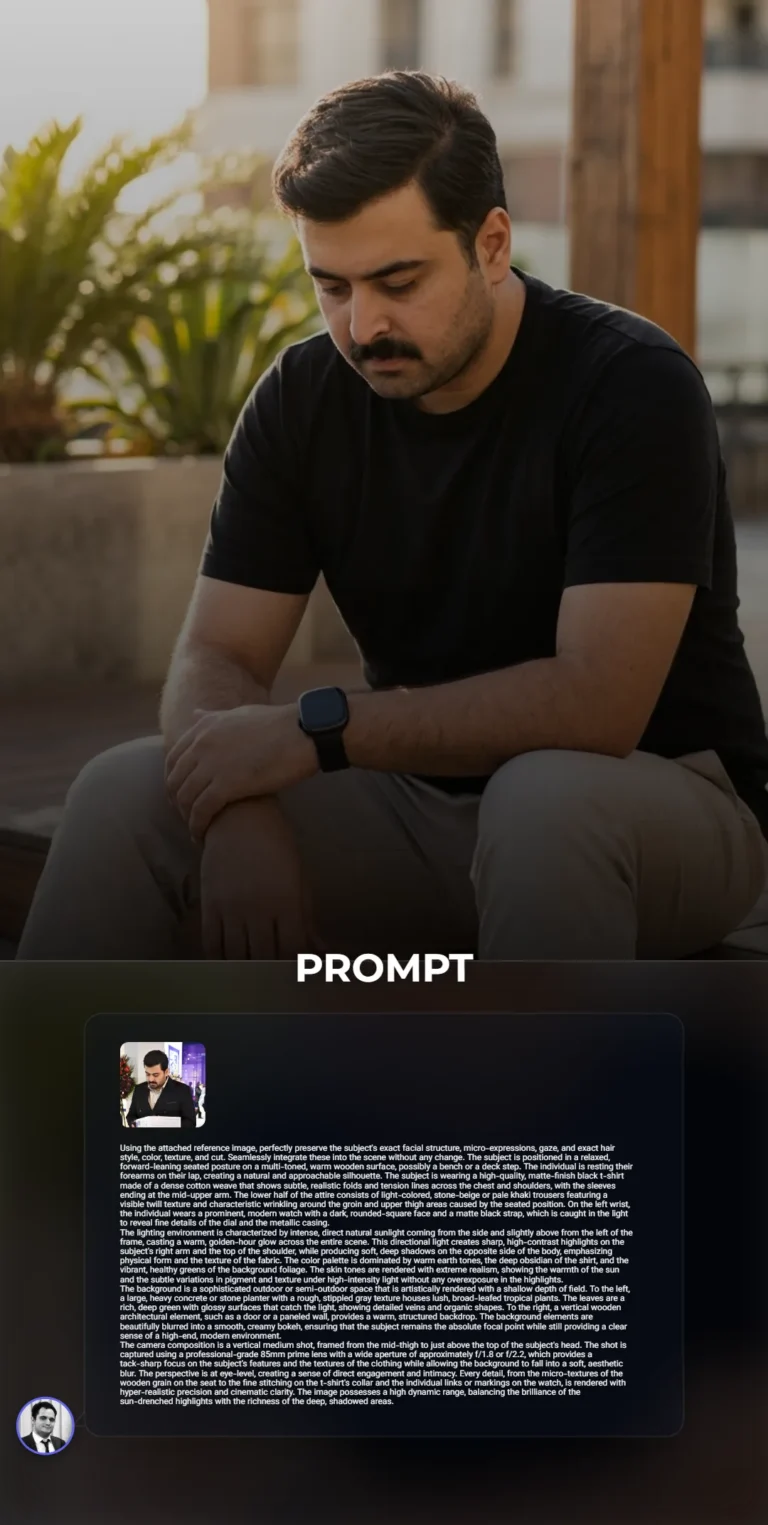
Hyper-Realistic Golden Hour Portrait: Modern Outdoor Male Lifestyle ShotUsing the attached reference image, perfectly preserve the subject's exact facial structure, micro-expressions, gaze, and exact hair style, color, texture, and cut. Seamlessly integrate these into the scene without any change. The subject is positioned in a relaxed, forward-leaning seated posture on a multi-toned, warm wooden surface, possibly a bench or a deck step. The individual is resting their forearms on their lap, creating a natural and approachable silhouette. The subject is wearing a high-quality, matte-finish black t-shirt made of a dense cotton weave that shows subtle, realistic folds and tension lines across the chest and shoulders, with the sleeves ending at the mid-upper arm. The lower half of the attire consists of light-colored, stone-beige or pale khaki trousers featuring a visible twill texture and characteristic wrinkling around the groin and upper thigh areas caused by the seated position. On the left wrist, the individual wears a prominent, modern watch with a dark, rounded-square face and a matte black strap, which is caught in the light to reveal fine details of the dial and the metallic casing.
The lighting environment is characterized by intense, direct natural sunlight coming from the side and slightly above from the left of the frame, casting a warm, golden-hour glow across the entire scene. This directional light creates sharp, high-contrast highlights on the subject's right arm and the top of the shoulder, while producing soft, deep shadows on the opposite side of the body, emphasizing physical form and the texture of the fabric. The color palette is dominated by warm earth tones, the deep obsidian of the shirt, and the vibrant, healthy greens of the background foliage. The skin tones are rendered with extreme realism, showing the warmth of the sun and the subtle variations in pigment and texture under high-intensity light without any overexposure in the highlights.
The background is a sophisticated outdoor or semi-outdoor space that is artistically rendered with a shallow depth of field. To the left, a large, heavy concrete or stone planter with a rough, stippled gray texture houses lush, broad-leafed tropical plants. The leaves are a rich, deep green with glossy surfaces that catch the light, showing detailed veins and organic shapes. To the right, a vertical wooden architectural element, such as a door or a paneled wall, provides a warm, structured backdrop. The background elements are beautifully blurred into a smooth, creamy bokeh, ensuring that the subject remains the absolute focal point while still providing a clear sense of a high-end, modern environment.
The camera composition is a vertical medium shot, framed from the mid-thigh to just above the top of the subject's head. The shot is captured using a professional-grade 85mm prime lens with a wide aperture of approximately f/1.8 or f/2.2, which provides a tack-sharp focus on the subject's features and the textures of the clothing while allowing the background to fall into a soft, aesthetic blur. The perspective is at eye-level, creating a sense of direct engagement and intimacy. Every detail, from the micro-textures of the wooden grain on the seat to the fine stitching on the t-shirt's collar and the individual links or markings on the watch, is rendered with hyper-realistic precision and cinematic clarity. The image possesses a high dynamic range, balancing the brilliance of the sun-drenched highlights with the richness of the deep, shadowed areas.
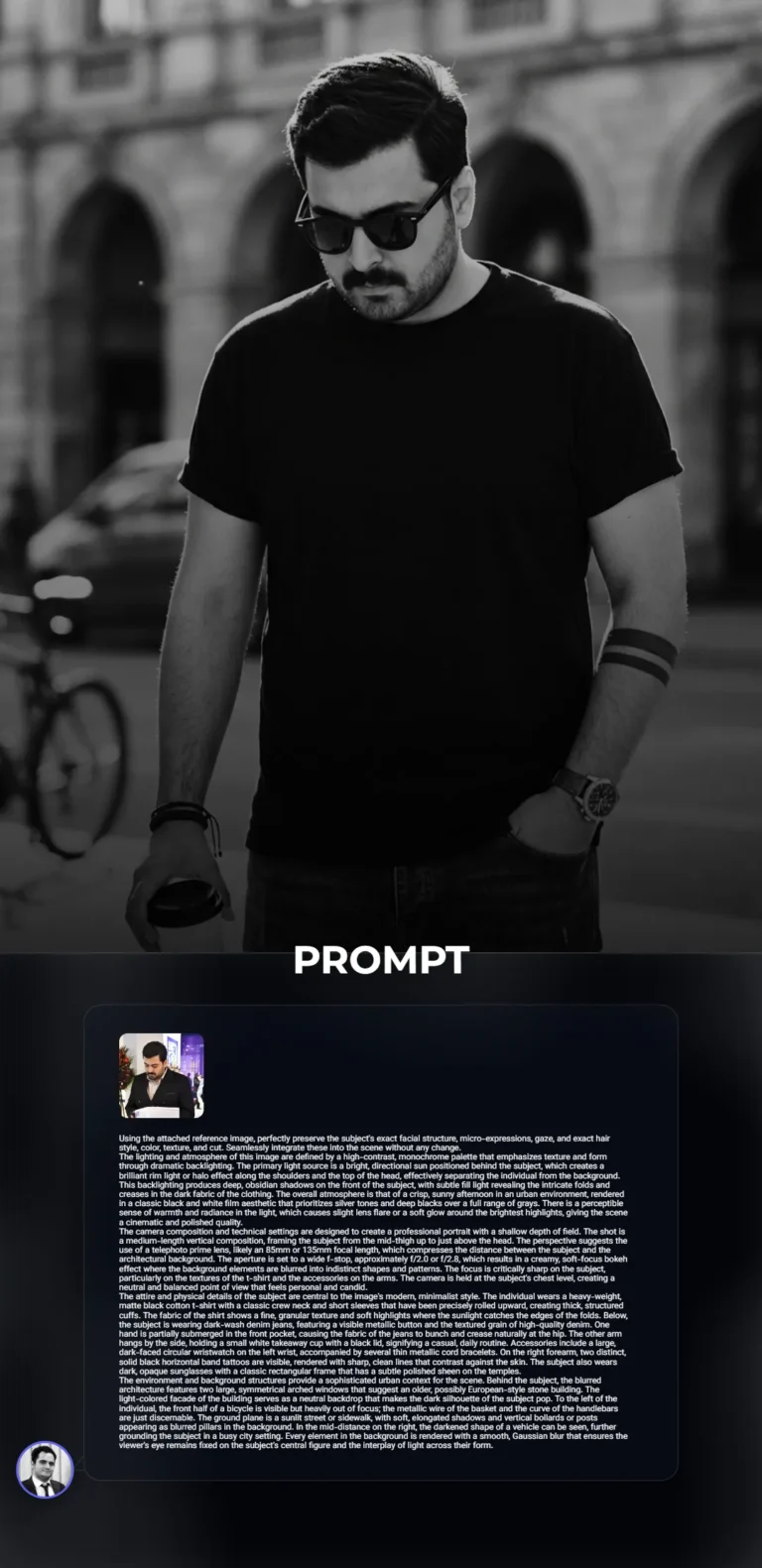
Cinematic B&W Urban Portrait - Backlit Minimalist Street StyleUsing the attached reference image, perfectly preserve the subject's exact facial structure, micro-expressions, gaze, and exact hair style, color, texture, and cut. Seamlessly integrate these into the scene without any change.
The lighting and atmosphere of this image are defined by a high-contrast, monochrome palette that emphasizes texture and form through dramatic backlighting. The primary light source is a bright, directional sun positioned behind the subject, which creates a brilliant rim light or halo effect along the shoulders and the top of the head, effectively separating the individual from the background. This backlighting produces deep, obsidian shadows on the front of the subject, with subtle fill light revealing the intricate folds and creases in the dark fabric of the clothing. The overall atmosphere is that of a crisp, sunny afternoon in an urban environment, rendered in a classic black and white film aesthetic that prioritizes silver tones and deep blacks over a full range of grays. There is a perceptible sense of warmth and radiance in the light, which causes slight lens flare or a soft glow around the brightest highlights, giving the scene a cinematic and polished quality.
The camera composition and technical settings are designed to create a professional portrait with a shallow depth of field. The shot is a medium-length vertical composition, framing the subject from the mid-thigh up to just above the head. The perspective suggests the use of a telephoto prime lens, likely an 85mm or 135mm focal length, which compresses the distance between the subject and the architectural background. The aperture is set to a wide f-stop, approximately f/2.0 or f/2.8, which results in a creamy, soft-focus bokeh effect where the background elements are blurred into indistinct shapes and patterns. The focus is critically sharp on the subject, particularly on the textures of the t-shirt and the accessories on the arms. The camera is held at the subject's chest level, creating a neutral and balanced point of view that feels personal and candid.
The attire and physical details of the subject are central to the image's modern, minimalist style. The individual wears a heavy-weight, matte black cotton t-shirt with a classic crew neck and short sleeves that have been precisely rolled upward, creating thick, structured cuffs. The fabric of the shirt shows a fine, granular texture and soft highlights where the sunlight catches the edges of the folds. Below, the subject is wearing dark-wash denim jeans, featuring a visible metallic button and the textured grain of high-quality denim. One hand is partially submerged in the front pocket, causing the fabric of the jeans to bunch and crease naturally at the hip. The other arm hangs by the side, holding a small white takeaway cup with a black lid, signifying a casual, daily routine. Accessories include a large, dark-faced circular wristwatch on the left wrist, accompanied by several thin metallic cord bracelets. On the right forearm, two distinct, solid black horizontal band tattoos are visible, rendered with sharp, clean lines that contrast against the skin. The subject also wears dark, opaque sunglasses with a classic rectangular frame that has a subtle polished sheen on the temples.
The environment and background structures provide a sophisticated urban context for the scene. Behind the subject, the blurred architecture features two large, symmetrical arched windows that suggest an older, possibly European-style stone building. The light-colored facade of the building serves as a neutral backdrop that makes the dark silhouette of the subject pop. To the left of the individual, the front half of a bicycle is visible but heavily out of focus; the metallic wire of the basket and the curve of the handlebars are just discernable. The ground plane is a sunlit street or sidewalk, with soft, elongated shadows and vertical bollards or posts appearing as blurred pillars in the background. In the mid-distance on the right, the darkened shape of a vehicle can be seen, further grounding the subject in a busy city setting. Every element in the background is rendered with a smooth, Gaussian blur that ensures the viewer's eye remains fixed on the subject's central figure and the interplay of light across their form.

Cinematic Golden Hour Portrait at Rustic Urban CafeUsing the attached reference image, perfectly preserve the subject's exact facial structure, micro-expressions, gaze, and exact hair style, color, texture, and cut. Seamlessly integrate these into the scene without any change. The camera is positioned at a low-angle perspective, looking slightly upward at the subject to create a sense of presence and stature. This vertical composition utilizes a professional full-frame camera equipped with an 85mm prime lens to achieve a tight, intimate framing that compresses the background while keeping the subject in razor-sharp focus. The aperture is set to a wide f/1.8 or f/2.8, resulting in a shallow depth of field that renders the background into a creamy, soft-focus bokeh, effectively isolating the individual from the architectural elements of the cafe. The framing captures the subject from the top of the head down to the feet, emphasizing a relaxed, cross-legged seated posture. Every detail is rendered with high-resolution clarity, capturing the minute nuances of the surrounding environment while maintaining a cinematic and polished aesthetic.
The lighting is dominated by intense, directional natural sunlight coming from an upper-side angle, characteristic of the golden hour or a bright late afternoon. This light creates a high-contrast chiaroscuro effect, with brilliant highlights tracing the contours of the subject and deep, well-defined shadows falling across the clothing and the floor. The sunlight catches the edges of the linen fabric, revealing its intricate weave, while the shadows under the table and behind the subject provide a sense of three-dimensional depth. There is a warm, amber-toned glow permeating the scene, reflecting off the wooden surfaces and casting a soft, golden radiance throughout the frame. The highlights are bright but retain detail, while the shadows are rich and saturated, contributing to a vibrant and dynamic visual atmosphere that feels both warm and inviting.
The subject is dressed in a sophisticated ensemble of layered neutral tones and high-quality textures. The outermost layer is an oversized, long-sleeved button-down shirt made of a heavy-weight, textured linen in a muted taupe or light beige hue. The fabric exhibits characteristic linen slubs and wrinkles, particularly around the elbows and chest, with the sleeves loosely rolled up to the mid-forearm. Underneath, a crisp, matte white cotton t-shirt provides a clean contrast, featuring a simple crew neck. The trousers are a pair of well-fitted, light cream or off-white chinos or linen-blend pants, showing prominent creases and folds where the legs are crossed. The footwear consists of clean, white low-top sneakers with subtle tan or light brown suede accents on the heel and tongue, featuring thick, off-white rubber soles. Accessories include a thin silver chain with a small circular pendant, a dark-beaded bracelet on the right wrist, and a sophisticated watch with a large black face and a dark metallic link strap on the left wrist.
The setting is a rustic yet modern outdoor cafe or bistro. The subject is seated on a dark, curved wooden chair with a visible grain and a polished finish. In front of the individual is a round, heavy wooden pedestal table with a rich, warm mahogany or walnut stain. On the table, a clear plastic cup filled with an iced latte or coffee drink sits prominently, showing visible ice cubes, a gradient of milk and coffee, a black straw, and a white label with the text ST. ALi COFFEE ROASTERS in bold, black sans-serif typography. Next to the coffee, a pair of classic dark-tinted sunglasses with gold-rimmed frames rests folded on the wooden surface. The background consists of a blurred cafe interior featuring dark wood paneling, shelving with metallic coffee-making equipment, and a chalkboard menu, all bathed in the same warm, diffused light. The floor is composed of dark, weathered stone tiles or pavers, catching the dappled light and shadows from the overhead structures or nearby trees, completing the urban, sun-drenched atmosphere.

Urban Streetwear Cinematic Portrait - Slate Blue Hoodie and White DenimUsing the attached reference image, perfectly preserve the subject's exact facial structure, micro-expressions, gaze, and exact hair style, color, texture, and cut. Seamlessly integrate these into the scene without any change. The subject is positioned in a seated, relaxed posture on a set of weathered outdoor wooden stairs, angled slightly away from the camera while looking toward the right of the frame. The subject is wearing an oversized, heavyweight hoodie in a deep slate-blue or muted indigo hue. The fabric of the hoodie is a thick, high-quality cotton fleece, characterized by a soft matte finish that catches the light in a subtle, diffused manner, showing heavy folds and deep sculptural creases around the elbows and torso. The cuffs of the hoodie are ribbed and slightly pushed up the forearms. On the subject's left wrist is a prominent, high-end stainless steel watch with a brushed metallic finish and a large, circular black dial featuring silver indices and a clear sapphire crystal that reflects the surrounding ambient light. The subject's hands are brought together in front of the midsection, with the right hand delicately adjusting the watch or the sleeve. The lower half of the attire consists of light-wash, almost white, straight-leg denim trousers. The denim has a visible diagonal twill weave and is finished with a distinct, raw, and frayed hem at the bottom, where individual white threads are exposed. The subject is seated on dark-stained wooden steps that show signs of natural wear, with visible wood grain, minor scuffs, and a rich, earthy texture.
The scene is captured with a professional-grade full-frame camera and a prime lens, likely an 85mm or 105mm focal length, to create a compressed perspective and a shallow depth of field. The aperture is set wide, around f/2.0 or f/2.8, which creates a soft, creamy bokeh in the background. The background elements, including a series of vertical and horizontal metal railing bars and a dark, shadowed architectural area, are rendered in a soft blur, ensuring the viewer's focus remains entirely on the subject. To the right of the subject, a black skateboard is leaned vertically against the stairs, showing a detailed honeycomb or perforated grip tape texture on its deck. The composition uses a medium-close shot, framing the subject from the mid-thigh up to the top of the head, with the camera positioned at a slightly low angle to give the subject a sense of presence and stature. The framing is tight, focusing on the interplay of the textures between the fabric, the metal of the watch, and the organic surface of the wood.
The lighting is natural, bright, and directional, suggesting an outdoor setting during the late afternoon when the sun is lower in the sky. This produces a soft but clear highlight along the subject's profile and the edges of the clothing, while the shadows remain open and full of detail rather than being crushed into pure black. There is a warm, golden-hour quality to the light that enhances the skin tones and adds a slight glow to the highlights of the hoodie. The color palette is sophisticated and restrained, dominated by the cool tones of the slate-blue hoodie and the stark white of the trousers, which are balanced by the warm browns of the wooden steps and the neutral blacks of the sunglasses and skateboard. The overall atmosphere is one of casual urban elegance, combining streetwear aesthetics with high-quality photography. Every detail, from the micro-textures of the frayed denim to the subtle reflections on the watch face, must be rendered with hyper-realistic precision to match the clarity and depth of the original image. The final render should have a filmic quality, with a subtle grain and a high dynamic range that preserves detail in both the bright white pants and the deep folds of the dark hoodie.
Professional Photographer in Moody Alpine Wilderness Fleece Hoodie PortraitUsing the attached reference image, perfectly preserve the subject's exact facial structure, micro-expressions, gaze, and exact hair style, color, texture, and cut. Seamlessly integrate these into the scene without any change. The individual is positioned centrally in a medium-shot composition, standing amidst a breathtaking and moody alpine wilderness. The camera composition utilizes a vertical orientation with a narrow depth of field, likely achieved with an 85mm or 105mm prime lens set to a wide aperture of f/1.8 or f/2.2, which creates a sophisticated separation between the subject and the sprawling background. The lighting is heavily diffused and soft, characteristic of a high-altitude environment under a thick, overcast sky during the blue hour or a misty morning. This lighting setup eliminates harsh highlights and deep shadows, instead casting an even, cool-toned illumination that emphasizes the rich textures of the subject's attire and the organic elements of the surroundings. The color palette is intentionally muted and cinematic, dominated by deep forest greens, slate blues, charcoal greys, and the subtle, desaturated brown of the earth, punctuated only by the vibrant, saturated yellow of wildflowers in the lower foreground.
The subject's clothing is a focal point of textural detail, featuring a premium, heavyweight charcoal-colored fleece hoodie. The fabric has a visible matte grain and soft pile, with thick, structural folds around the torso and arms that indicate a high-quality, dense material. The hood is pulled up, framing the upper portion of the head with a clean, curved silhouette. The hoodie includes thick, braided drawstrings that hang symmetrically and ribbed elastic cuffs that cinch tightly at the wrists. On the left chest, there is a very small, minimalist silver or light grey logo. The individual also wears matching dark, technical-style trousers made of a durable, slightly structured synthetic or cotton-blend fabric, with one hand tucked casually into a side pocket. In the other hand, the individual holds a large, professional-grade black DSLR or mirrorless camera body equipped with a substantial telephoto or fast prime lens. The camera is held up to the eye level, with the lens facing directly toward the viewer, capturing intricate reflections on the multi-coated glass elements, including subtle concentric circles and iridescent glints of light.
The environment is rendered with extreme atmospheric detail. In the immediate foreground to the right, clusters of yellow wildflowers, possibly ragwort or alpine daisies, are positioned close to the lens, creating a beautiful, soft-focus bokeh effect that adds a layer of depth and a pop of warm color to the cool scene. Behind the subject, a mountain river or stream flows through the valley, its water appearing as a soft, blurred texture of white and dark blue, indicating movement. The middle ground is populated by tall, dark coniferous trees like spruce or fir, their needles and branches becoming increasingly blurred as they recede into the distance. The background is dominated by the massive, imposing slopes of mountains that are partially obscured by a thick, low-hanging mist or fog, which creates a sense of vast, quiet scale and isolation. The air appears heavy with moisture, adding a palpable sense of cold, crisp mountain air. The final image must maintain this exact balance of sharp, high-fidelity detail on the subject and the camera equipment against the dreamlike, ethereal softness of the misty alpine landscape.

Cinematic Golden Hour Mountain Portrait - Matte Black Hoodie StyleUsing the attached reference image, perfectly preserve the subject's exact facial structure, micro-expressions, gaze, and exact hair style, color, texture, and cut. Seamlessly integrate these into the scene without any change. The image is a vertical portrait with a cinematic 9:16 aspect ratio, capturing a serene and contemplative moment at the peak of golden hour. The camera is positioned at a medium distance, focusing on the subject from the waist up in a three-quarter rear-facing profile as the individual looks out toward a vast mountain range. The composition utilizes a shallow depth of field, achieved with a professional-grade prime lens such as an 85mm f/1.4, which keeps the subject in razor-sharp focus while rendering the background into a soft, creamy bokeh. The lighting is the defining element of the scene, featuring a dramatic sunset that creates a brilliant backlight. The sky is a complex tapestry of horizontal cloud formations, ranging from wispy cirrus to denser altostratus, illuminated with a gradient of incandescent oranges, fiery yellows, and muted charcoal greys. This backlighting produces a delicate rim light effect along the edges of the subject's silhouette, separating the dark clothing from the hazy background. The atmospheric perspective is palpable, with multiple layers of jagged mountain ridges receding into the distance, their colors shifting from a dark, desaturated navy blue to a pale, misty cerulean near the horizon. The subject is wearing an oversized, heavy-weight hoodie made of premium matte black cotton jersey. The fabric is thick and substantial, creating deep, voluminous folds and shadows that emphasize its texture and the relaxed posture of the individual. The cuffs of the hoodie are slightly ribbed and gathered. On the left wrist, the subject wears a minimalist, all-black analog wristwatch with a large circular face and a matte finish, secured by a smooth, dark leather or silicone strap. The hand is positioned naturally, resting near the lap, showing realistic skin textures and subtle highlights on the knuckles. The individual is also wearing dark charcoal or faded black denim jeans, where the coarse weave of the fabric and the fine details of the stitching are visible in the lower portion of the frame. The subject is leaning against a rough, weathered stone surface that appears to be part of a ledge or a mountain overlook, with visible pits, cracks, and grey mineral textures. The overall color grading is sophisticated, balancing the deep, crushed blacks of the foreground elements with the high-saturation warm tones of the sky, creating a mood of quiet, stoic introspection. The rendering must be of the highest quality, capturing micro-details such as the weave of the cotton, the metallic sheen of the watch hardware, and the soft diffusion of light through the evening haze.

Cinematic High-Fashion Portrait of Subject with White Long-Haired CatUsing the attached reference image, perfectly preserve the subject's exact facial structure, micro-expressions, gaze, and exact hair style, color, texture, and cut. Seamlessly integrate these into the scene without any change. The subject is positioned in a central, close-up frame, filling most of the vertical space from the chest upward. The individual is leaning in close to a white long-haired cat, creating an intimate and warm portrait. One hand is raised toward the temple, fingers gently grasping the edge of a black knit beanie, while the other hand cradles the cat’s lower body, with fingers delicately holding one of the cat's front paws to reveal the soft pink paw pads. The cat is positioned in the lower-left foreground, looking directly toward the viewer with large, luminous blue eyes. The composition focuses heavily on the interaction between the individual and the animal, creating an atmosphere of gentle affection and calm.
The scene is illuminated by professional studio lighting that is soft and directional, likely from a large softbox positioned slightly to the camera's left. This creates a gentle gradient across the skin, highlighting the facial contours and forehead while casting soft, cinematic shadows on the opposite side. The lighting is meticulously balanced to prevent harsh highlights, maintaining a smooth, matte quality on the skin and the cat’s fur. Sharp, tiny catchlights are reflected in both the subject's and the cat's eyes, giving them a lifelike, sparkling appearance. The overall atmosphere is quiet, modern, and high-fashion, with a clean and sophisticated tonal range that emphasizes clarity and texture.
The individual wears a black t-shirt made of a high-quality, matte cotton jersey fabric, which shows subtle folds and a fine grain where it meets the neck. A black, ribbed knit beanie sits atop the head, showing a distinct tactile weave and soft woolen fibers with a slight fuzziness to the material. The accessories are captured with high precision: a medium-gauge silver chain necklace hangs around the neck, ending in a polished, teardrop-shaped silver pendant that catches the soft studio light. On the hand holding the cat, there is a large, chunky silver ring with an oxidized, textured finish and a smaller, two-toned ring consisting of a silver band and a thin gold inset. A simple, polished silver hoop earring is visible on the ear, reflecting the surrounding environment.
The cat is a striking white long-hair breed with fur that is exceptionally bright and clean. Individual strands are visible, showing a mix of fine undercoat and longer guard hairs that create a soft, ethereal halo around its body against the dark clothing. The cat’s eyes are a deep, clear cerulean blue with dark pupils. Its nose is a soft, pale pink, matching the color of the articulated paw pads held by the subject. The fur around the cat’s face is dense and plush, transitioning into longer, wispy whiskers that extend outward. The contrast between the brilliant white fur and the subject's dark clothing and beanie is sharp and intentional, drawing the eye to the center of the frame.
The image is captured as if through a high-resolution full-frame camera using a portrait-length lens, such as an 85mm prime, with a wide aperture of approximately f/2.0. This choice of lens creates a shallow depth of field, resulting in a creamy, out-of-focus background while keeping the subject's features and the cat’s face in razor-sharp focus. The camera is positioned at eye level, fostering a direct connection with the viewer. The framing is a tight vertical portrait, cutting off just below the chest and at the top of the beanie, emphasizing the proximity and emotional bond.
The background is a minimalist, dark charcoal grey studio backdrop with a subtle, mottled texture reminiscent of hand-painted canvas or fine concrete. It is significantly darker than the subject, providing a neutral stage that allows the white cat and the skin tones to stand out prominently. The color palette is highly controlled and sophisticated, dominated by monochromatic tones of black, grey, and white, with the only warmth coming from the natural skin tones and the soft pink accents on the cat’s nose and paws. The rendering is crisp and clean, with a slight filmic grain that adds to the professional editorial quality of the photograph.

Urban Studio Portrait with Intense Orange Rim LightingUsing the attached reference image, perfectly preserve the subject's exact facial structure, micro-expressions, gaze, and exact hair style, color, texture, and cut. Seamlessly integrate these into the scene without any change. The scene is set against a monochromatic, high-intensity orange background that possesses a luminous, saturated quality, creating a vibrant and energetic atmosphere. This backdrop is not perfectly flat but features a subtle, soft-box glow emanating from behind the individual, creating a gentle gradient that is slightly brighter in the center and deepens toward the edges of the frame. The lighting is a sophisticated dual-tone studio arrangement, characterized by a dramatic red-orange rim light that sharply defines the silhouette on the right side of the frame, catching the edges of the clothing and the individual's skin with a fiery, saturated glow. A softer, more neutral key light illuminates the subject from the front-left, ensuring that the textures of the garments and the intricacies of the tattoos are clearly visible while maintaining deep, cinematic shadows that provide a three-dimensional depth to the composition.
The subject is wearing an oversized, heavyweight black cotton t-shirt with a thick, ribbed crew-neck collar. The fabric of the shirt has a matte finish that absorbs light, contrasted sharply by a large, centered graphic in a crisp, bone-white hue. This graphic consists of abstract, jagged, flame-like shapes or distorted, organic lettering that reaches upward across the chest. The sleeves are wide and drop-shouldered, ending mid-forearm to reveal a series of detailed tattoos. On the individual's right forearm, there is an intricate, dark ink illustration of a bird or phoenix with spread wings, while the left hand and fingers are adorned with complex, fine-line patterns and shading. A specific piece of script-style calligraphy is visible on the side of the neck, following the natural curve of the anatomy. The individual's hands are positioned in the lower center of the frame, with one hand gently grasping the fingers of the other in a candid, contemplative gesture.
Accessory details are critical for accuracy, including the thin-framed, round-lens spectacles that have a subtle tortoiseshell or metallic brown finish, catching a bright glint of the studio lights on the lenses. The individual wears a thick, polished silver curb-link chain bracelet on the left wrist, and multiple heavy, ornate metallic rings on the fingers, including a dark signet ring on the right hand and a silver-toned band on the left. The camera composition is a waist-up medium shot, utilizing a professional 85mm prime lens to achieve a shallow depth of field. This ensures the mid-plane of the subject is in razor-sharp focus, while the hands in the foreground and the extreme background exhibit a very soft, aesthetic blur. The digital rendering must be of the highest quality, with no visible noise, emphasizing the clean lines, the high-contrast color palette of orange, black, and white, and the tactile textures of the fabric and ink. The overall mood is one of modern, urban intensity, captured with a high-shutter speed to freeze the subtle micro-expression and the stillness of the pose.

Hyper-Realistic Golden Hour Portrait: Modern Outdoor Male Lifestyle ShotUsing the attached reference image, perfectly preserve the subject's exact facial structure, micro-expressions, gaze, and exact hair style, color, texture, and cut. Seamlessly integrate these into the scene without any change. The subject is positioned in a relaxed, forward-leaning seated posture on a multi-toned, warm wooden surface, possibly a bench or a deck step. The individual is resting their forearms on their lap, creating a natural and approachable silhouette. The subject is wearing a high-quality, matte-finish black t-shirt made of a dense cotton weave that shows subtle, realistic folds and tension lines across the chest and shoulders, with the sleeves ending at the mid-upper arm. The lower half of the attire consists of light-colored, stone-beige or pale khaki trousers featuring a visible twill texture and characteristic wrinkling around the groin and upper thigh areas caused by the seated position. On the left wrist, the individual wears a prominent, modern watch with a dark, rounded-square face and a matte black strap, which is caught in the light to reveal fine details of the dial and the metallic casing.
The lighting environment is characterized by intense, direct natural sunlight coming from the side and slightly above from the left of the frame, casting a warm, golden-hour glow across the entire scene. This directional light creates sharp, high-contrast highlights on the subject's right arm and the top of the shoulder, while producing soft, deep shadows on the opposite side of the body, emphasizing physical form and the texture of the fabric. The color palette is dominated by warm earth tones, the deep obsidian of the shirt, and the vibrant, healthy greens of the background foliage. The skin tones are rendered with extreme realism, showing the warmth of the sun and the subtle variations in pigment and texture under high-intensity light without any overexposure in the highlights.
The background is a sophisticated outdoor or semi-outdoor space that is artistically rendered with a shallow depth of field. To the left, a large, heavy concrete or stone planter with a rough, stippled gray texture houses lush, broad-leafed tropical plants. The leaves are a rich, deep green with glossy surfaces that catch the light, showing detailed veins and organic shapes. To the right, a vertical wooden architectural element, such as a door or a paneled wall, provides a warm, structured backdrop. The background elements are beautifully blurred into a smooth, creamy bokeh, ensuring that the subject remains the absolute focal point while still providing a clear sense of a high-end, modern environment.
The camera composition is a vertical medium shot, framed from the mid-thigh to just above the top of the subject's head. The shot is captured using a professional-grade 85mm prime lens with a wide aperture of approximately f/1.8 or f/2.2, which provides a tack-sharp focus on the subject's features and the textures of the clothing while allowing the background to fall into a soft, aesthetic blur. The perspective is at eye-level, creating a sense of direct engagement and intimacy. Every detail, from the micro-textures of the wooden grain on the seat to the fine stitching on the t-shirt's collar and the individual links or markings on the watch, is rendered with hyper-realistic precision and cinematic clarity. The image possesses a high dynamic range, balancing the brilliance of the sun-drenched highlights with the richness of the deep, shadowed areas.
Cinematic B&W Urban Portrait - Backlit Minimalist Street StyleUsing the attached reference image, perfectly preserve the subject's exact facial structure, micro-expressions, gaze, and exact hair style, color, texture, and cut. Seamlessly integrate these into the scene without any change.
The lighting and atmosphere of this image are defined by a high-contrast, monochrome palette that emphasizes texture and form through dramatic backlighting. The primary light source is a bright, directional sun positioned behind the subject, which creates a brilliant rim light or halo effect along the shoulders and the top of the head, effectively separating the individual from the background. This backlighting produces deep, obsidian shadows on the front of the subject, with subtle fill light revealing the intricate folds and creases in the dark fabric of the clothing. The overall atmosphere is that of a crisp, sunny afternoon in an urban environment, rendered in a classic black and white film aesthetic that prioritizes silver tones and deep blacks over a full range of grays. There is a perceptible sense of warmth and radiance in the light, which causes slight lens flare or a soft glow around the brightest highlights, giving the scene a cinematic and polished quality.
The camera composition and technical settings are designed to create a professional portrait with a shallow depth of field. The shot is a medium-length vertical composition, framing the subject from the mid-thigh up to just above the head. The perspective suggests the use of a telephoto prime lens, likely an 85mm or 135mm focal length, which compresses the distance between the subject and the architectural background. The aperture is set to a wide f-stop, approximately f/2.0 or f/2.8, which results in a creamy, soft-focus bokeh effect where the background elements are blurred into indistinct shapes and patterns. The focus is critically sharp on the subject, particularly on the textures of the t-shirt and the accessories on the arms. The camera is held at the subject's chest level, creating a neutral and balanced point of view that feels personal and candid.
The attire and physical details of the subject are central to the image's modern, minimalist style. The individual wears a heavy-weight, matte black cotton t-shirt with a classic crew neck and short sleeves that have been precisely rolled upward, creating thick, structured cuffs. The fabric of the shirt shows a fine, granular texture and soft highlights where the sunlight catches the edges of the folds. Below, the subject is wearing dark-wash denim jeans, featuring a visible metallic button and the textured grain of high-quality denim. One hand is partially submerged in the front pocket, causing the fabric of the jeans to bunch and crease naturally at the hip. The other arm hangs by the side, holding a small white takeaway cup with a black lid, signifying a casual, daily routine. Accessories include a large, dark-faced circular wristwatch on the left wrist, accompanied by several thin metallic cord bracelets. On the right forearm, two distinct, solid black horizontal band tattoos are visible, rendered with sharp, clean lines that contrast against the skin. The subject also wears dark, opaque sunglasses with a classic rectangular frame that has a subtle polished sheen on the temples.
The environment and background structures provide a sophisticated urban context for the scene. Behind the subject, the blurred architecture features two large, symmetrical arched windows that suggest an older, possibly European-style stone building. The light-colored facade of the building serves as a neutral backdrop that makes the dark silhouette of the subject pop. To the left of the individual, the front half of a bicycle is visible but heavily out of focus; the metallic wire of the basket and the curve of the handlebars are just discernable. The ground plane is a sunlit street or sidewalk, with soft, elongated shadows and vertical bollards or posts appearing as blurred pillars in the background. In the mid-distance on the right, the darkened shape of a vehicle can be seen, further grounding the subject in a busy city setting. Every element in the background is rendered with a smooth, Gaussian blur that ensures the viewer's eye remains fixed on the subject's central figure and the interplay of light across their form.

Cinematic Golden Hour Portrait at Rustic Urban CafeUsing the attached reference image, perfectly preserve the subject's exact facial structure, micro-expressions, gaze, and exact hair style, color, texture, and cut. Seamlessly integrate these into the scene without any change. The camera is positioned at a low-angle perspective, looking slightly upward at the subject to create a sense of presence and stature. This vertical composition utilizes a professional full-frame camera equipped with an 85mm prime lens to achieve a tight, intimate framing that compresses the background while keeping the subject in razor-sharp focus. The aperture is set to a wide f/1.8 or f/2.8, resulting in a shallow depth of field that renders the background into a creamy, soft-focus bokeh, effectively isolating the individual from the architectural elements of the cafe. The framing captures the subject from the top of the head down to the feet, emphasizing a relaxed, cross-legged seated posture. Every detail is rendered with high-resolution clarity, capturing the minute nuances of the surrounding environment while maintaining a cinematic and polished aesthetic.
The lighting is dominated by intense, directional natural sunlight coming from an upper-side angle, characteristic of the golden hour or a bright late afternoon. This light creates a high-contrast chiaroscuro effect, with brilliant highlights tracing the contours of the subject and deep, well-defined shadows falling across the clothing and the floor. The sunlight catches the edges of the linen fabric, revealing its intricate weave, while the shadows under the table and behind the subject provide a sense of three-dimensional depth. There is a warm, amber-toned glow permeating the scene, reflecting off the wooden surfaces and casting a soft, golden radiance throughout the frame. The highlights are bright but retain detail, while the shadows are rich and saturated, contributing to a vibrant and dynamic visual atmosphere that feels both warm and inviting.
The subject is dressed in a sophisticated ensemble of layered neutral tones and high-quality textures. The outermost layer is an oversized, long-sleeved button-down shirt made of a heavy-weight, textured linen in a muted taupe or light beige hue. The fabric exhibits characteristic linen slubs and wrinkles, particularly around the elbows and chest, with the sleeves loosely rolled up to the mid-forearm. Underneath, a crisp, matte white cotton t-shirt provides a clean contrast, featuring a simple crew neck. The trousers are a pair of well-fitted, light cream or off-white chinos or linen-blend pants, showing prominent creases and folds where the legs are crossed. The footwear consists of clean, white low-top sneakers with subtle tan or light brown suede accents on the heel and tongue, featuring thick, off-white rubber soles. Accessories include a thin silver chain with a small circular pendant, a dark-beaded bracelet on the right wrist, and a sophisticated watch with a large black face and a dark metallic link strap on the left wrist.
The setting is a rustic yet modern outdoor cafe or bistro. The subject is seated on a dark, curved wooden chair with a visible grain and a polished finish. In front of the individual is a round, heavy wooden pedestal table with a rich, warm mahogany or walnut stain. On the table, a clear plastic cup filled with an iced latte or coffee drink sits prominently, showing visible ice cubes, a gradient of milk and coffee, a black straw, and a white label with the text ST. ALi COFFEE ROASTERS in bold, black sans-serif typography. Next to the coffee, a pair of classic dark-tinted sunglasses with gold-rimmed frames rests folded on the wooden surface. The background consists of a blurred cafe interior featuring dark wood paneling, shelving with metallic coffee-making equipment, and a chalkboard menu, all bathed in the same warm, diffused light. The floor is composed of dark, weathered stone tiles or pavers, catching the dappled light and shadows from the overhead structures or nearby trees, completing the urban, sun-drenched atmosphere.